


By now, you’ve probably heard the news about the new LSAT interface going live starting with the 2026 August LSAT. While there are significant changes—or rather, “updates,” as LSAC calls them—there are also things not changing.
We asked our Blueprint LSAT instructors to break down every confirmed change with screenshots, examples, and practical explanations. This guide will continue to be updated as LSAC releases more information, so you can stay ahead of the changes without the panic spiral.
What Is Not Changing on the LSAT
Before we get into all the exciting changes, let’s take a moment to emphasize what’s not changing on the LSAT.
The LSAT itself is not changing!
The look and feel of LawHub is going to be different, and there will be some minor changes to how the user interface works. However, the test itself isn’t changing. There will still be four 35-minute multiple-choice sections, with two scored Logical Reasoning sections, one scored Reading Comprehension section, and one unscored section that could be either Logical Reasoning or Reading Comprehension.
Flaws will still be flaws. Conditional reasoning will still be conditional reasoning. And Reading Comprehension passages will still be long, rambling diatribes that feel like they were written to torture the people who read them.
That means you don’t have to learn any new content or develop any new strategies for the exam itself. It will still be the same LSAT you’ve come to know and love. (Oh, admit it – you have a soft spot for this exam, just like we do!)
What Is Changing on the LSAT
There are a few interface changes, ranging from merely aesthetic to “that’s going to take some getting used to.” Let’s start with the biggest change.
1. The Righthand Menu
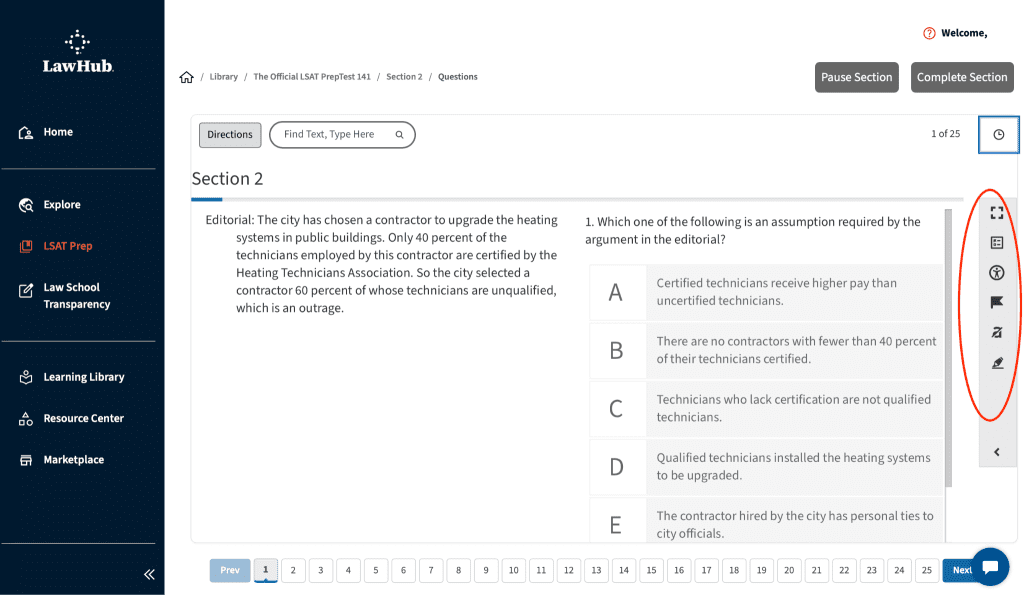
The new LSAT user interface has added an expandable menu on the right side of the screen. This menu contains some tools that used to be available on the main screen, and it adds a few new features. In this menu, you’ll find:
- Full Screen mode. This allows you to expand the LawHub window to take up your entire computer screen.
- Review callout box. This is a new tool that allows you to see which questions you’ve answered, which ones are still incomplete, and which questions you flagged for later viewing. You can filter out only the questions you want to see and click on any one to go directly to that question.

- Accessibility tools. These are tools that allow you to customize the look and feel of the interface. Many of these tools were available before (e.g., changing font size and line height), but it also adds a few new color schemes so that you can find the combination of background and text colors that you find most suitable.
- Flag. This is a new location for the flagging tool, which allows you to add a flag to questions you may want to revisit later. The flag will appear above the appropriate question in the navigation bar at the bottom, and it will also show up in the Review callout box described above.
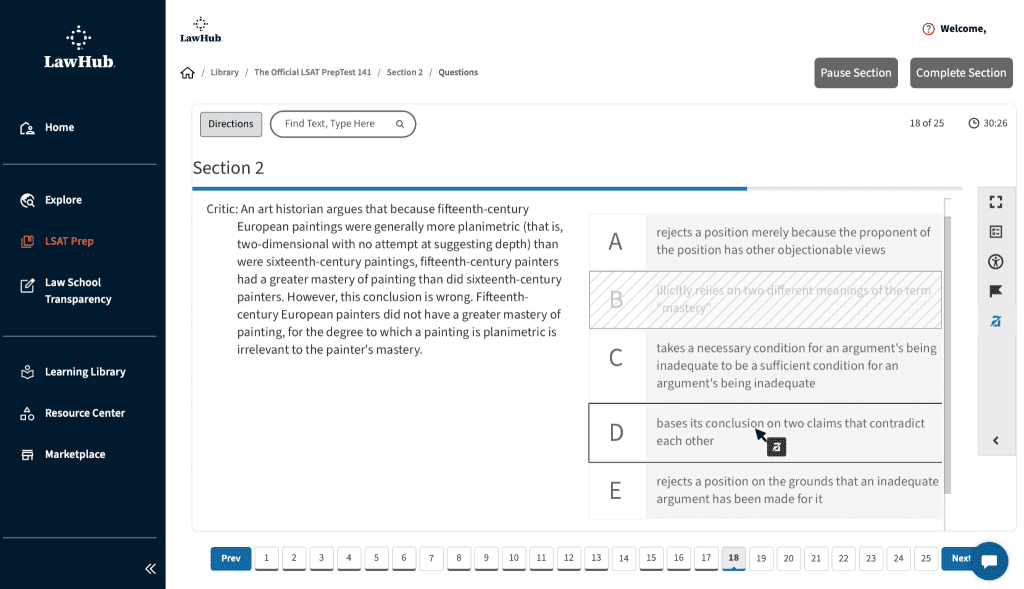
- Response masking. This is one of the more significant changes to the interface. Gone are the buttons to the right of each response that allow you to gray out, or “mask,” choices you’ve eliminated. Instead, you now have to click on the “response masking” button to activate the masking tool. Once activated, you can click on any answer choice to gray it out. When you’re done eliminating choices, you click again on the “response masking” button to turn the tool off. For those used to the current method for masking choices, this may be the tool that will require the most practice to get used to.
- Keyboard highlight. Clicking on this button allows you to navigate through the text using the arrow keys on your keyboard instead of using the mouse. If you select text by holding down the Shift key, a highlighter button will appear, allowing you to highlight whatever text you’ve selected.
2. Highlighting
The keyboard highlight button isn’t the only change to highlighter functionality. In fact, highlighting text is now a whole new experience. Instead of clicking on a button at the top, you bring up a highlighter button by selecting the text you want to highlight first—either by clicking and dragging the mouse or by holding Shift when moving over text in keyboard highlight mode.

When the button appears, you can click it to highlight whatever text you selected. If you want to change the color of your highlighter, you have to click the down arrow next to the highlighter button.

You can then select the color you want from the new lineup—yellow, pink, green, and blue—and then click the highlight button to add that color highlighting to the selected text. Also, there is no longer a separate underline button. Instead, each color highlighter contains a different style of underlining: solid line, long dashes, short dashes, or dots.
Finally, if you want to remove highlighting, a “Remove” button will appear whenever you click on or select highlighted text. The whole highlighting process will require a little more clicking than it did in the previous interface, so it’s worth taking some time to get used to it.
3. Response Selection
Besides the new menu and highlighter functions, the other major changes involve the answer choices. Some of these changes are merely aesthetic, but there are a couple of functional updates, too.
Previously, the five answer choices were preceded by ovals, labeled A through E. To select the answer of your choice, you would click on the appropriate oval, which would then appear filled in like test-takers used to do when filling in a Scantron grid… on paper… with a pencil.
Now, each answer appears in its own lettered box. If you want to select an answer, you can click on the letter or anywhere else in the entire response. In addition, when you select an answer, the entire response will be highlighted, so it will be absolutely clear which choice you’ve selected.

But what if you select an answer and decide, “nah – that’s not right”? If you know which answer you’d prefer, just click on that one, and the new choice will be highlighted instead. However, if you feel like you completely flubbed your approach and want to start over from scratch, you can use the brand-new “Reset Response” button. Just one click, and the response highlighting will disappear, as will any masking you did to eliminate choices.

Essentially, it’s a big “do over” button that sets things back to square one for that question. Most likely, you shouldn’t need this button unless you realize you made a significant mistake.
Check out our review of the 2026 interface changes!
@blueprintlsat 🚨 Taking the August 2026 LSAT? This one’s for you! LSAC is rolling out a new LSAT interface and while it’s not a total overhaul, there are a few changes you’ll want to get ahead of before test day. Blueprint LSAT instructor Ross walks you through some of the changes, including: ✔️ Highlighter changes ✔️ The number of questions you can see on the screen ✔️ How to eliminate questions The good news? You’ll be able to take practice LSAT exams on LawHub with this new interface starting in May, so nothing on test day should feel brand new. And while these are mostly minor changes, these small things can throw you off if you’re not ready. Let us know what you think of the changes in the comments! 💬 . . . #lsat #lsatprep #lsatstudying #blueprintlsat #prelaw ♬ original sound – Blueprint LSAT Prep
Final Thoughts
So, is that all the changes LSAC is implementing on the LSAT? We can, with 100% certainty, say… maybe. These changes are already active in your LawHub account for all PrepTests, but the LSAC may still make some minor tweaks. We’ll keep you updated if we learn anything new.
In the meantime, make sure you take some time to check out the new features, and keep practicing to get the awesome scores we know you’re capable of!
Blueprint LSAT students increase their LSAT scores by 15 points, on average. Whether it’s in a Live Course or 170+ Course led by expert Blueprint instructors, in a Self-Paced Course that gives you total control over your schedule and studying, or one-on-one with a tutor, we have the LSAT prep that fits your learning style.
Get started today with a Blueprint LSAT free trial!

An earlier version of this post was originally published June 5, 2026.